
An AI assistant cannot normally read a local project folder, query a private database, or create a calendar event merely because the user asks. Model Context Protocol provides a standardized way for an AI application to connect to external data and tools.
MCP is an open standard, not an AI model and not a single product. It defines how compatible applications and servers exchange capabilities and context. Those connections can be powerful, so the permissions behind them matter as much as the protocol.
Quick answer: MCP is a common connector between an AI application and selected files, services, and actions. It reduces custom integration work; it does not make an integration safe automatically.
Last verified: July 2026. The current official architecture documentation demonstrates protocol version 2025-06-18. Hosts negotiate versions and capabilities, and not every host implements every optional feature.
What is Model Context Protocol?
Model Context Protocol is an open-source standard for connecting AI applications to external systems. It standardizes messages for discovering and using context such as resources, tools, and reusable prompts. The official documentation compares it to a standard connector: useful as an analogy, although software permissions and trust remain specific to each implementation.
MCP does not decide how a model reasons, which information is placed into a conversation, or whether an action should be approved. The host application, server, model, user settings, and downstream service jointly determine the result.
Always evaluate the complete path from the user’s request to the final system that reads data or performs the action.
The problem MCP is designed to solve
Without a common protocol, every AI application needs a custom integration for every filesystem, database, ticket system, calendar, and API. Developers repeatedly implement authentication, capability discovery, message formats, and result handling.
With MCP, a compatible server can expose selected capabilities in a standardized form and a compatible host can connect through an MCP client. One server may therefore work with multiple hosts, subject to the features and authorization each one supports.
MCP architecture in plain English
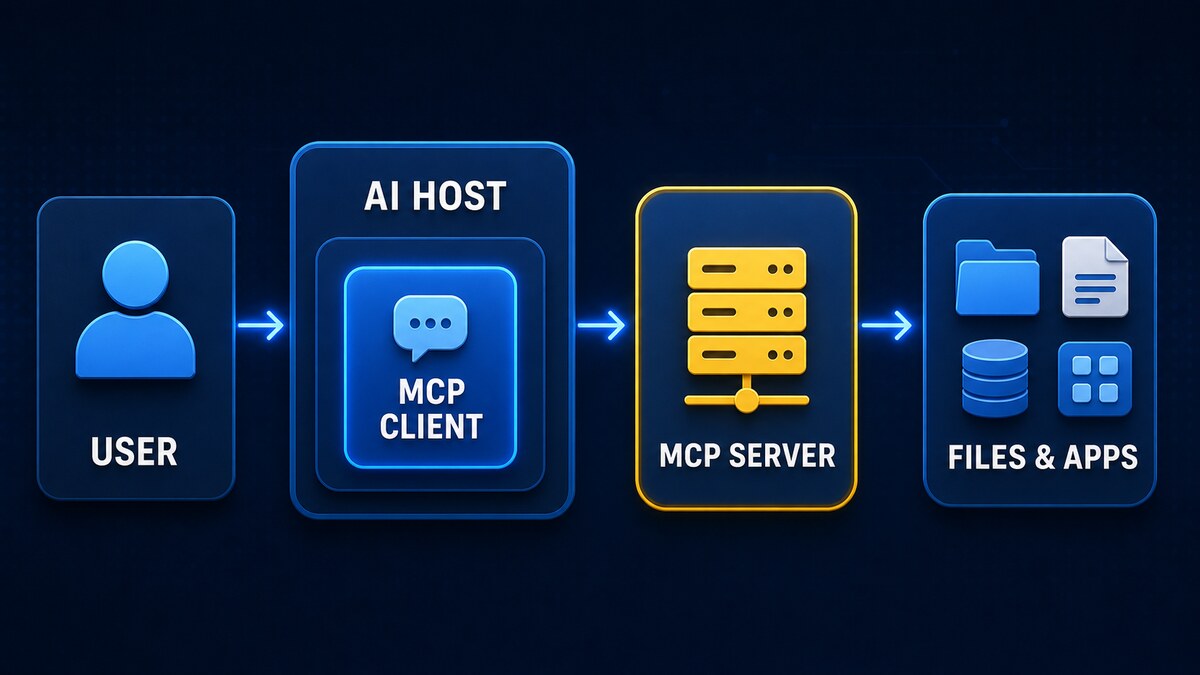
- Host: the AI application the user interacts with. It coordinates one or more clients.
- Client: a component inside the host that maintains a dedicated connection to one server.
- Server: a local program or remote service that exposes selected capabilities.
- Resources: data sources the client can read, such as files, schemas, or records.
- Tools: executable functions an AI application can request, such as an API call or database query.
- Prompts: reusable templates supplied by a server to structure interactions.
User -> AI host -> MCP client -> MCP server -> file, API, database, or application
A host normally creates one client connection for each server. Local servers commonly communicate through standard input/output, while remote servers can use Streamable HTTP. MCP uses JSON-RPC 2.0 at its data layer and negotiates supported features during initialization.
Capability negotiation matters because a connection may offer tools, resources, prompts, notifications, sampling, or user elicitation in different combinations. A client should use only features both sides declare. Seeing a server in a configuration file does not prove that it is connected, compatible, authorized, or safe to invoke.
Tool discovery provides a name, description, and input schema that helps the host form a structured request. The server still performs the operation and the downstream system must enforce authorization. Schema validation can reject malformed arguments, but it cannot determine that a valid-looking calendar invitation, file write, or database query is appropriate.
Practical MCP examples
- Read a project directory: useful for code assistance, but an overly broad path could expose unrelated source code, credentials, or personal files.
- Query a database: a read-only analytics identity limits damage; a privileged credential could expose or change sensitive records.
- Look up GitHub issues: issue text can contain untrusted instructions, while a broad token may also permit repository changes.
- Search company documentation: access controls must prevent the assistant from retrieving documents the current user is not allowed to see.
- Read or create calendar events: write access can send invitations or expose attendee information, so external actions need confirmation.
- Call an internal API: a narrow endpoint and service identity are safer than a general token spanning production systems.
Capabilities vary by server. A filesystem server might expose only reads, or it might offer writes and deletions. Inspect the actual tool list, parameters, credentials, and host approval behavior rather than relying on the server’s name.
Is an MCP server safe?
An MCP server is executable software or a remote service. A local server runs with the operating-system access granted to its process; a remote server receives whatever requests and data the client sends. Installing an unknown server should be treated like installing other privileged integration software.
- Filesystem scope: broad directories can expose secrets and unrelated data.
- API credentials: powerful tokens can turn a minor mistake into a production change.
- Tool descriptions: malicious or altered metadata can influence when an agent selects a tool.
- Prompt injection: untrusted documents or webpages can try to steer tool use.
- Data exfiltration: a server may transmit inputs or results to unexpected destinations.
- Supply chain: packages, install scripts, and updates can be compromised.
- Remote trust: operators may log data, change behavior, or experience a breach.
- Sensitive logs: prompts, tool parameters, and results may contain confidential information.
MCP standardizes communication; it is not a security sandbox. Authorization must be enforced by the host, server, operating system, and downstream service. Human confirmation should show the exact action and destination, not a vague “allow tool” message.
For remote servers, confirm who operates the endpoint, how authentication tokens are obtained and stored, which regions process data, and what is logged. Use TLS, short-lived credentials where supported, and a separate service identity. For local servers, inspect the launch command and package source; a local process can still use the network or read anything its operating-system account permits.
MCP security checklist
- Prefer official or well-maintained servers.
- Review source, installation scripts, and dependencies where practical.
- Run local servers as an unprivileged user.
- Expose only the directories required for the task.
- Use narrowly scoped, revocable credentials.
- Separate read-only tools from write-capable tools.
- Require confirmation for destructive, privileged, or external actions.
- Inspect logs and expected network destinations without recording unnecessary secrets.
- Pin versions where appropriate and review changes before updating.
- Disable and remove servers that are no longer needed.
Use separate development accounts and test data. Avoid passing production dumps, password-manager exports, SSH keys, browser profiles, or unrestricted cloud credentials through an MCP workflow.
MCP versus plugins, APIs, and function calling
| Term | What it means |
|---|---|
| API | An interface offered by a service for reading data or performing operations. |
| Function/tool calling | A model capability for selecting a structured action and supplying arguments. |
| MCP | A standard protocol through which AI applications discover and use context and tools. |
| Plugin | A broad product term for an extension; it may use MCP, a proprietary API, or another mechanism. |
An MCP tool often wraps an existing API, and a model may use function calling to request it. The terms describe different layers rather than competing technologies.
Frequently asked questions
Does MCP send all my files to the AI?
No. Access depends on the directories, resources, tools, host behavior, and permissions you configure. A poorly scoped server can still expose much more than intended.
Can an MCP server run commands?
It can if it implements a command-execution tool and its process has permission. The protocol itself does not grant shell access automatically.
Does MCP work only with Claude?
No. MCP is an open protocol supported by multiple hosts. Verify a particular product’s current official documentation and supported features before configuring it.
Is MCP local or cloud based?
Either. Servers can run locally or remotely, and the AI model itself may also be local or hosted. Trace the complete data path.
Can MCP servers access one another?
Servers normally connect to clients, not directly to each other. A host or tool may combine results across servers, and a server can call downstream services if implemented and authorized.
Should I install an MCP server from a random repository?
No. Verify its owner, source, dependencies, releases, requested permissions, and network behavior. Test it with restricted credentials and data first.
This article provides general security guidance. Evaluate each server and host against your own data, permissions, and threat model.
Comments