A fluent answer is not evidence. Language models can produce accurate explanations, outdated information, unsupported conclusions, or entirely fabricated details in the same confident tone. The amount of checking you do should increase with the harm a wrong answer could cause.
That does not make every AI answer unreliable. It means the output is a useful starting point—not proof. This guide provides a repeatable way to verify facts, citations, commands, dates, product specifications, and technical instructions before relying on them.
Quick rule: use AI freely for low-stakes ideas, check important claims against primary sources, and involve a qualified professional when an error could affect health, legal rights, finances, security, or production systems.
Last verified: July 2026. Product features, software versions, regulations, and documentation can change.
Why AI answers can be wrong
A language model generates a likely response from patterns rather than consulting an internal database of guaranteed truths. It can combine correct ideas in an incorrect way, fill a gap with a plausible detail, or answer an ambiguous question without noticing that essential context is missing.
Its learned knowledge may also be incomplete or outdated. Search and retrieval tools can supply newer material, but the model may misunderstand a source, give too much weight to a weak page, or draw a conclusion the source does not support. OpenAI’s own guidance warns that ChatGPT can produce inaccurate facts and fabricated quotations, studies, citations, or references.
Technical output creates another problem: a command can be valid yet wrong for your operating system, version, path, account permissions, or production environment. Correct syntax is not the same as a safe change.
The wording of the question matters as well. If you ask for “the best” tool without stating your budget, operating system, location, or required features, the assistant must guess what best means. Improve the answer before fact-checking it by supplying the missing constraints and asking the model to state its assumptions. Verification is easier when the claim is specific enough to test.
The risk-based verification rule
Low stakes
Brainstorming, entertainment, alternative wording, and rough outlines usually need little checking. You can judge whether the result is useful, although factual claims inside it still deserve review before publication.
Medium stakes
Product choices, educational explanations, purchases, and reversible configuration changes deserve source checks. Confirm model numbers, current prices, supported versions, prerequisites, and the rollback method.
High stakes
Medical, legal, financial, identity, security, destructive commands, and production-infrastructure decisions require authoritative sources and careful independent review. Obtain qualified human advice where appropriate. An AI disclaimer does not reduce the real-world consequences of acting on a wrong answer.
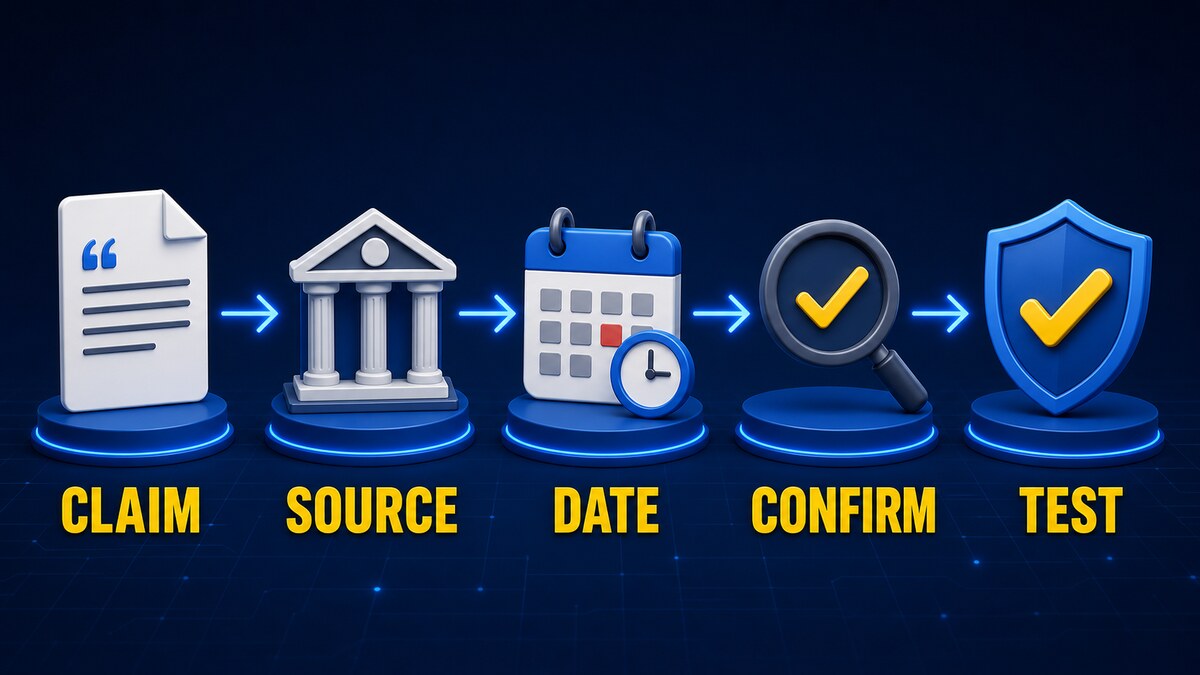
The seven-step verification workflow
1. Separate claims from explanation
Turn the answer into a list of statements that can be checked. Highlight names, dates, version numbers, prices, causes, quotations, legal requirements, supported platforms, and commands. “This update requires Windows 11 24H2” is a claim; the surrounding explanation is not evidence for it.
2. Ask for sources, but do not trust the source list automatically
Ask the assistant for the strongest source behind each important claim. Treat every citation as a lead until you open it. A realistic title, author, journal, DOI, or URL can still be malformed, unrelated, or entirely invented.
3. Open every important source
Confirm that the page exists, its title and author match, and its date is relevant. Find the passage supporting the claim. A page that discusses the same topic does not necessarily support the answer’s conclusion.
Read enough context to detect conditions and exceptions. “Supported on Windows” may refer only to one edition, hardware architecture, subscription tier, or preview channel.
4. Prefer primary sources
- Vendor documentation for product behavior and supported versions
- Government or official legislative text for regulations
- Original research papers and publisher records for study results
- CVE records and vendor advisories for vulnerabilities
- Manufacturer manuals for hardware specifications and servicing
Primary does not always mean complete or impartial. Independent testing is useful for real-world performance, reliability, usability, and claims a vendor cannot objectively assess. Use each source for the question it can actually answer.
5. Check recency and version context
Record the software version, operating system, publication and update dates, region, subscription tier, hardware revision, and feature status. A preview feature documented last year may now be generally available, renamed, restricted, or removed.
6. Look for independent confirmation
For an important claim, look for at least one credible source that is genuinely separate. Ten articles repeating the same press release or unverified report are not ten confirmations. Trace each account back to its original evidence.
7. Test safely
Read a command before running it and check every unfamiliar flag in built-in help and official documentation. Prefer read-only mode, a lab, virtual machine, container, disposable test data, or a Git branch. Create a backup and define the rollback before a configuration change.
Avoid piping a remote script directly into a shell. Inspect what will run, restrict permissions, execute one stage at a time, and compare the actual result with the AI’s prediction before continuing.
How to verify an AI-generated citation
- Search the exact title in quotation marks.
- Verify the author names and publication.
- Confirm the DOI, ISBN, case number, or other official identifier.
- Open the publisher, journal, court, agency, or institutional page.
- Find the passage or result the answer attributes to the source.
- Check for corrections, withdrawals, or retractions.
- Treat a plausible reference that does not exist as fabricated.
Be particularly careful with direct quotations. Search for the exact sentence, then read the paragraph around it. A real quote can still be shortened or presented outside the conditions that gave it meaning.
How to verify a technical command
Suppose an assistant recommends the harmless PowerShell command Get-ComputerInfo to display system information. Verify it without assuming the explanation is correct:
- Identify the executable or cmdlet: here it is the PowerShell cmdlet
Get-ComputerInfo. - Read built-in help with
Get-Help Get-ComputerInfo -Full. - Check its parameters in Microsoft’s current PowerShell documentation.
- Confirm that the command reports information rather than changing configuration.
- Run it first on a non-sensitive computer or use a narrowly selected property.
- Compare the actual output with what the assistant predicted.
The same method applies to Linux commands, cloud CLIs, registry changes, and configuration files. If you cannot explain what a command and each flag will do, do not run it with elevated privileges.
Warning signs in an AI answer
- Precise claims have no sources.
- The cited pages do not mention the claimed fact.
- Specific percentages or performance figures have no methodology.
- The answer is confident despite missing version, region, or environment details.
- Product names, editions, or releases are mixed together.
- A command contains unfamiliar or undocumented flags.
- A quotation cannot be found in the stated source.
- A plausible citation points to a nonexistent page.
- The answer relies on words such as “all,” “always,” or “guaranteed.”
- The conclusion changes dramatically when challenged, without explaining why.
A reusable verification prompt
List the factual claims in your answer. For each claim, provide the strongest primary source, its publication or update date, and a short explanation of exactly how the source supports the claim. Mark anything you could not verify.
This prompt makes an answer easier to review, but it does not prove the citations are genuine. Open the sources yourself and check the supporting passage.
AI Answer Verification Checklist
- List the important factual claims.
- Scale checking to the possible harm.
- Ask for primary sources and open them.
- Confirm title, author, date, version, and supporting passage.
- Look for independent evidence.
- Verify citations and quotations at the publisher.
- Read commands and every flag before execution.
- Use read-only checks, a test environment, backup, and rollback.
- Mark unresolved claims instead of guessing.
Frequently asked questions
Does web browsing stop hallucinations?
No. Browsing can provide current sources, but a model can select a weak page, misunderstand it, or make a claim the page does not support. Open and evaluate important citations.
Are citations generated by AI reliable?
They are useful leads, not automatic proof. Confirm that each reference exists and that the source actually supports the statement attributed to it.
Is asking the same model twice a valid check?
No. The model may repeat the same error or generate a different unsupported answer. Verification requires evidence outside the original response.
Can I use another AI model as confirmation?
A second model can expose disagreements worth investigating, but it is not an independent factual source. Models may share training material, search results, and common misconceptions.
How many sources are enough?
There is no universal number. One definitive primary source may settle a product specification, while a disputed or high-stakes conclusion may require several independent sources and professional judgment.
Should I trust an answer that includes direct quotations?
Not without checking. Confirm the exact wording in the original source and read the surrounding context for omissions, qualifications, or a different meaning.
This article provides a general verification method, not medical, legal, financial, or security advice. Consult an appropriate professional for high-stakes decisions.
Comments