
An “AI PC” is still a PC. The meaningful hardware difference is usually a neural processing unit (NPU): a specialized accelerator designed to run supported machine-learning workloads efficiently, often with lower power use than a CPU or GPU. It does not make every application intelligent, and it will not automatically speed up a cloud chatbot.
If you are buying a laptop anyway, an NPU can improve longevity and enable on-device Windows features. If your current computer works well and you mainly use browser-based AI, the NPU label alone is a weak reason to upgrade.
CPU, GPU, and NPU are different tools
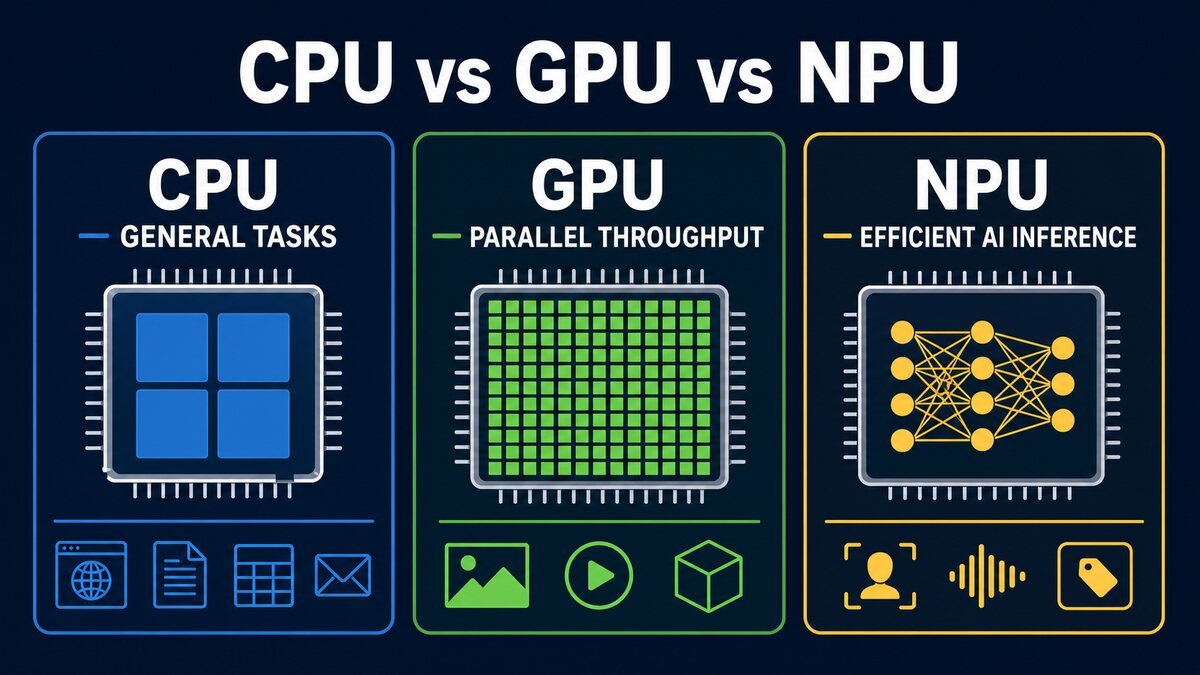
- CPU: flexible general-purpose processing, operating-system work, and universal fallback.
- GPU: high parallel throughput, graphics, large generative workloads, and often the fastest local inference when a capable discrete GPU is available.
- NPU: sustained, power-efficient AI inference for models and software specifically prepared to use it.
Software support is decisive. An application must use a compatible runtime and execution provider. Microsoft’s current Windows ML guidance can select supported NPU, GPU, or CPU backends and fall back when a preferred accelerator is unavailable.
What TOPS means—and what it does not
TOPS means trillions of operations per second. It is a peak throughput measure commonly used for NPUs, but it is not a complete benchmark. Precision, memory bandwidth, model conversion, drivers, thermal limits, and utilization affect real performance. Figures from different vendors may not be directly comparable.
A 40-TOPS NPU does not imply that every model runs twice as fast as on a 20-TOPS design. The application may not support either NPU, may fall back to the GPU, or may be constrained by memory rather than arithmetic.
What is a Copilot+ PC?
As checked on July 26, 2026, Microsoft describes Copilot+ PCs as Windows 11 devices with a high-performance NPU capable of at least 40 TOPS and other platform requirements. Copilot+ is a hardware and Windows device category; it is not the same thing as purchasing a Microsoft Copilot subscription.
Supported features vary by processor, Windows build, language, region, and rollout. Examples may include Windows Studio Effects, live captions and translation, Cocreator, Recall, Click to Do, semantic search, and Windows AI APIs. Check the exact model’s current support page instead of assuming every advertised feature is ready everywhere.
Will an NPU accelerate local language models?
Sometimes. The model format, quantization, runtime, execution provider, and hardware must align. Windows ML uses ONNX Runtime and can obtain compatible execution providers. Microsoft Foundry on Windows also supplies on-device models and broader local model options, but availability and performance differ by machine.
A discrete GPU may remain faster for larger language or image models because of throughput and dedicated memory. CPU-only inference is also possible, usually with lower speed. System RAM matters because a model that does not fit comfortably in memory will perform poorly regardless of the NPU badge.
Does an NPU improve cloud AI?
Cloud inference runs on the provider’s servers. Network latency and service load matter more than your NPU. The local chip may still help with camera effects, microphone cleanup, transcription, or other preprocessing, but it does not make a remote model generate answers faster.
Who should consider an AI PC?
- You are already replacing a laptop and expect to keep it several years.
- You want specific, verified Copilot+ features.
- You value battery-efficient on-device inference or offline workflows.
- You develop or test Windows AI applications.
Who probably should not upgrade for the NPU alone?
- You use only cloud chatbots.
- Your current PC meets normal performance needs.
- You need high-end local-model performance better served by a discrete GPU.
- You need more RAM, storage, ports, repairability, or battery life more than an AI feature.
AI-PC buying checklist
- Verify the exact NPU TOPS and processor model.
- Check RAM capacity and whether it is upgradeable.
- Confirm your model runtime supports that NPU.
- Verify desired Windows features for the processor, region, language, and build.
- Evaluate display, keyboard, ports, battery, repairability, and warranty.
- Consider GPU and memory requirements separately.
Frequently asked questions
Does an NPU replace a GPU?
No. The GPU remains important for graphics and high-throughput compute. The NPU targets efficient supported AI workloads.
Can I add an NPU later?
Usually not in a laptop. NPUs are commonly integrated into the processor platform.
Is an AI PC more private?
On-device processing can keep a supported task local, but privacy depends on the application, settings, telemetry, and connected services—not the chip alone.
Feature availability and hardware definitions were checked July 26, 2026. Verify current Microsoft and device-vendor documentation before buying.
Comments